Check the expected files
The refresh confirms the period, sender, filename and required columns before combining data.

Excel and Power Query
For finance, operations and reporting teams whose recurring work begins with folders of files and ends in a workbook, review pack or action log.
Quanta Meridian separates file intake, query logic, approved adjustments, checks and reviewed outputs so the workbook can be refreshed and handed over.
Which files entered the refresh, what changed them, which adjustments were approved and do the workbook totals still reconcile?
See the finished examplesIn the monthly sales workbook, eight regional files replace manual copying. In the supplier-quality build, six plants provide defect and downtime files. Power Query combines the expected files and checks their structure; Excel keeps the visible issue decision, approved adjustments and report tie-out. A missing file is treated as a reporting problem, not silently ignored.
The refresh confirms the period, sender, filename and required columns before combining data.
Reusable functions, filters, types and reference joins remain visible in Power Query.
Manual corrections have an owner, reason and approval instead of being typed over source values.
Row counts, sales, margin, defects or downtime tie to the refreshed inputs.
The owner releases, limits or holds the output and leaves instructions for the next run.
A controlled workbook can still support familiar review and commentary. The change is that source files are loaded through named queries, transformations are inspectable and manual decisions sit in dedicated tables rather than being mixed into formulas.
Parameters and reusable functions reduce repeated steps. Data types are assigned early, rows are filtered before expensive operations and query names explain their purpose to the next analyst.
If one plant file is missing, the combined defect total will be incomplete even though the remaining files are valid. The refresh therefore records the missing input and blocks or limits the report according to the agreed release rule.
The projects include working XLSX files, embedded Power Query where claimed, source data, checks, results and handover notes. Screenshots show the workbook, but do not replace the file itself.
A finished example
From Monthly Sales and Margin Workbook Rebuild. The XLSX retains a real folder function, staged M code, named checks and a separate failed row result.
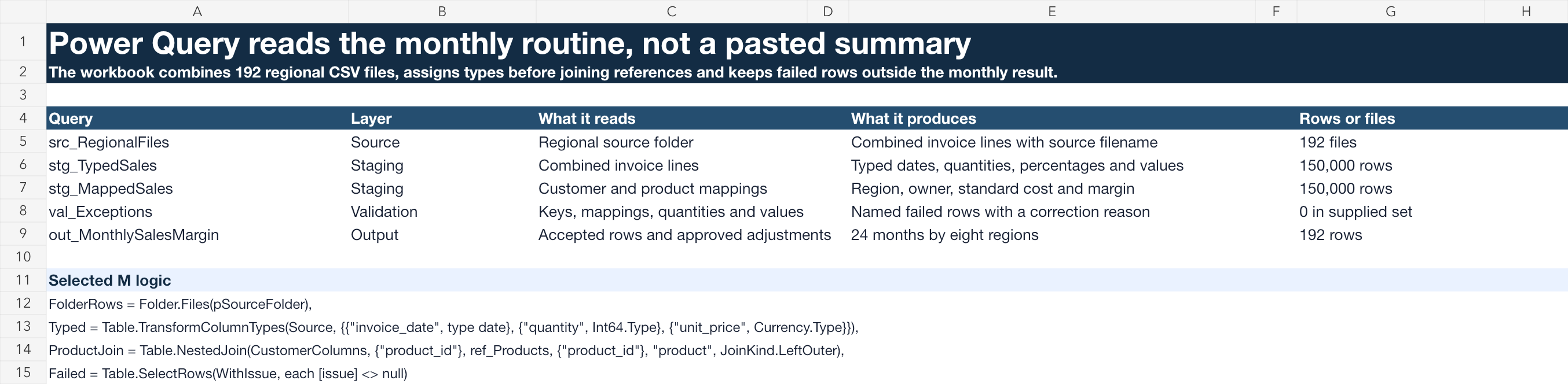
Evidence type: working Excel workbook
Where this is used
These examples use workbooks to combine files, recalculate results and support review. Each link shows the original workbook and the instructions or checks another analyst would need for the next update.
Browse all 6 project examplesEight regions send monthly sales files and manual copying can hide a missing file or changed column.
Power Query imports, types and joins the files while Excel keeps approved adjustments and the issue decision.
The working workbook includes the folder function, M code, failed rows, reconciled sales and margin, and the June issue decision.
Finance and Operations need the same on-time-delivery formula in SQL, Excel and Power BI.
The catalogue gives the workbook a named formula reference, version and approved treatment of split orders.
Known cases and one two-line order confirm implementation equivalence.
The management pack and analytical reports publish different delivery percentages.
A real reconciliation workbook independently calculates each numerator and denominator and records the fix.
The exact bridge from each report result to the approved figure is retained.
A missing product mapping removes a supplier category from the monthly report.
The native register preserves impact, containment, correction, independent retest and release history.
The workbook contains realistic multi-period issues and one incident documented in full.
A long monthly status pack contains many charts but does not make the leadership meeting easier.
A source workbook feeds a concise six-page operating review with four material exceptions, three decisions and named actions.
The PPTX, PDF, source tie-outs, decision log and action carry-forward are retained.
Metric owners must explain material movements before the monthly pack is issued.
The workbook applies thresholds, records responses and reviewer challenges, and carries deferred decisions once into the next cycle.
Aged backlog rising from 420 to 515 cases is traced through explanation, meeting decision and next-month action.
Working boundary
A workbook is appropriate when its scale, users and controls fit the routine. It should not conceal unstable source structures, uncontrolled access or transformations that need a managed data platform.
Bring one recurring workbook, a sample of the monthly files and the checks used before issue. The first review can identify what should remain visible to the analyst and what should become repeatable.
View the Reporting Systems solutionDiscuss this capabilityReturn to all capabilities