Reporting Systems

Rebuild the monthly report around its files, checks and review meeting.

For finance, operations, programme and reporting teams whose weekly or monthly packs depend on manual consolidation.

Quanta Meridian maps the sales exports, reference files and manual adjustments, builds a repeatable preparation layer and records what must pass before Finance and Operations receive the figures.

RecordsSales files to management review
ControlDefinitions and checks
ContinuityRefresh owner and handover

The working examples cover a wholesale reporting mart, an eight-region sales workbook, a six-page monthly operating review and the commentary requests raised before that pack is issued. Together they show how order lines, sales files, definitions, checks and management decisions form one reporting routine.

Common signs

The report gets finished, but nobody can explain every figure.

A monthly sales and margin report can still arrive on time while depending on one analyst copying eight regional files, applying remembered adjustments and checking totals by hand.

Finance then questions a margin movement, Operations is using a different delivery definition, or one late file leaves no time to explain the figures before the leadership meeting.

The rebuild names every input, keeps approved adjustments separate and records the checks that decide whether the six-page operating review can be issued.

Monthly reporting cycle

Keep every file, check and decision behind the report visible.

Each step names the records received, the work performed and the result passed forward. Exceptions go to a named owner rather than disappearing inside the finished pack.

  1. Sales files · systems
    01Map the monthly reporting cycle

    Trace each sales file, reference table, adjustment, reviewer and deadline before changing the build.

    Documented process
  2. Questions · rules
    02Agree the measures

    Record the population, timing, calculation, exclusions and owner for the figures people discuss.

    Agreed measures
  3. Imported rows · adjustment
    03Separate the preparation

    Keep imported records, preparation logic and approved manual adjustments distinct and inspectable.

    Prepared data
  4. Counts · values
    04Add the controls

    Reconcile row counts and values, retain exceptions and state what blocks or limits the report.

    Checked result
    Exception and ownerResolve, record and retest
  5. Movement · context
    05Shape the review

    Bring material movement, commentary, decisions and named actions into a concise review pack.

    Review pack
  6. Decision · timetable
    06Document the next run

    Name the refresh owner, file locations, timetable, checks, known limits and change process.

    Owned next run
Sales exports and reference tables → preparation → definitions → control checks → management review → action and handover.

How the work proceeds

Start with the current routine, not a preferred tool.

The work follows the report from the first sales export through to the next review meeting and refresh. The build changes only after the rules, exceptions and owners are understood.

The first step follows one complete month: the files received, reference tables used, manual changes made, checks performed and questions raised before the pack is issued.

Power Query or SQL then prepares the records repeatably. Approved adjustments remain visible, and missing files or failed totals stop or limit the report according to an agreed rule.

The final pages concentrate on material exceptions, decisions and named actions. The handover tells the next analyst how to refresh the build and what must pass before release.

The working handover

The next analyst can run the report and explain what changed.

The process map, preparation logic, checks and review pack stay connected. A reviewer can move from a questioned figure to the invoice lines, adjustment and rule that produced it.

01

Understand the routine

Make the monthly reporting cycle and its rules visible before deciding what should change.

The handover retains monthly reporting process map, file and system register and KPI definitions.

02

Control the build

Separate preparation from adjustments and retain the checks needed to explain the result.

The handover retains controlled workbook or reporting model and validation results and failed records.

03

Run the review

Give reviewers a focused pack and leave the next owner with workable refresh instructions.

The handover retains review pack and refresh and handover notes.

Choosing the working environment

Use the simplest working environment that fits the routine.

Excel, SQL and Power BI solve different parts of a reporting problem. Documentation remains part of every reporting routine.

Excel and Power Query

The routine is file based, the scale is manageable and the people running it need a familiar workbook.

Imported files, query logic, adjustments and checks still need to be separated and documented.

SQL

Joins, history, repeated rules or record-level traceability need a more structured and reproducible model.

A SQL model does not decide what the measures mean or how the review should operate.

Power BI

An agreed reporting model needs shared measures, interactive review and a managed refresh process.

Power BI follows the reporting question, record checks and ownership; it does not replace them.

Documentation

Every reporting routine needs another person to understand the files, rules, checks and next run.

The notes must match the working build and named owners rather than describing an ideal process.

Verified project evidence

Four builds prove the monthly routine from working files to meeting.

Inspect the wholesale reporting mart, the eight-region workbook, the six-page operating review and the commentary process that starts before the meeting.

Executed DuckDB evidence showing sales, purchasing and stock fact counts, the May 2016 commercial result and passing release controls
01

SQL-backed Reporting Foundation

A wholesale reporting mart built from Microsoft’s Wide World Importers sample database so sales, purchasing, stock and margin reports use the same customers, products, dates and totals.

Executed mart and release results. The retained result combines the actual query result with the release decision. It shows what loaded, what the latest monthly mart contains and whether the checks allow publication.Inspect this project
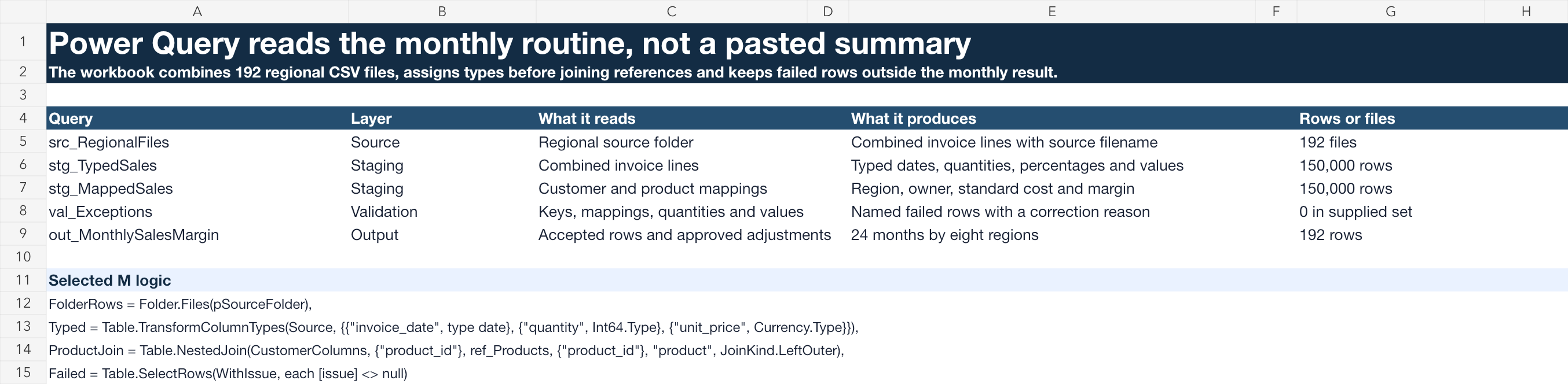
Native workbook evidence showing the regional folder query, typed staging, customer and product joins, failed row output and selected Power Query M code
02

Monthly Sales and Margin Workbook Rebuild

An Excel and Power Query rebuild that replaces the monthly copying of regional sales files with a repeatable refresh, visible adjustments and a checked sales and margin pack.

Folder query and staged Power Query. The XLSX retains a real folder function, staged M code, named checks and a separate failed row result.Inspect this project
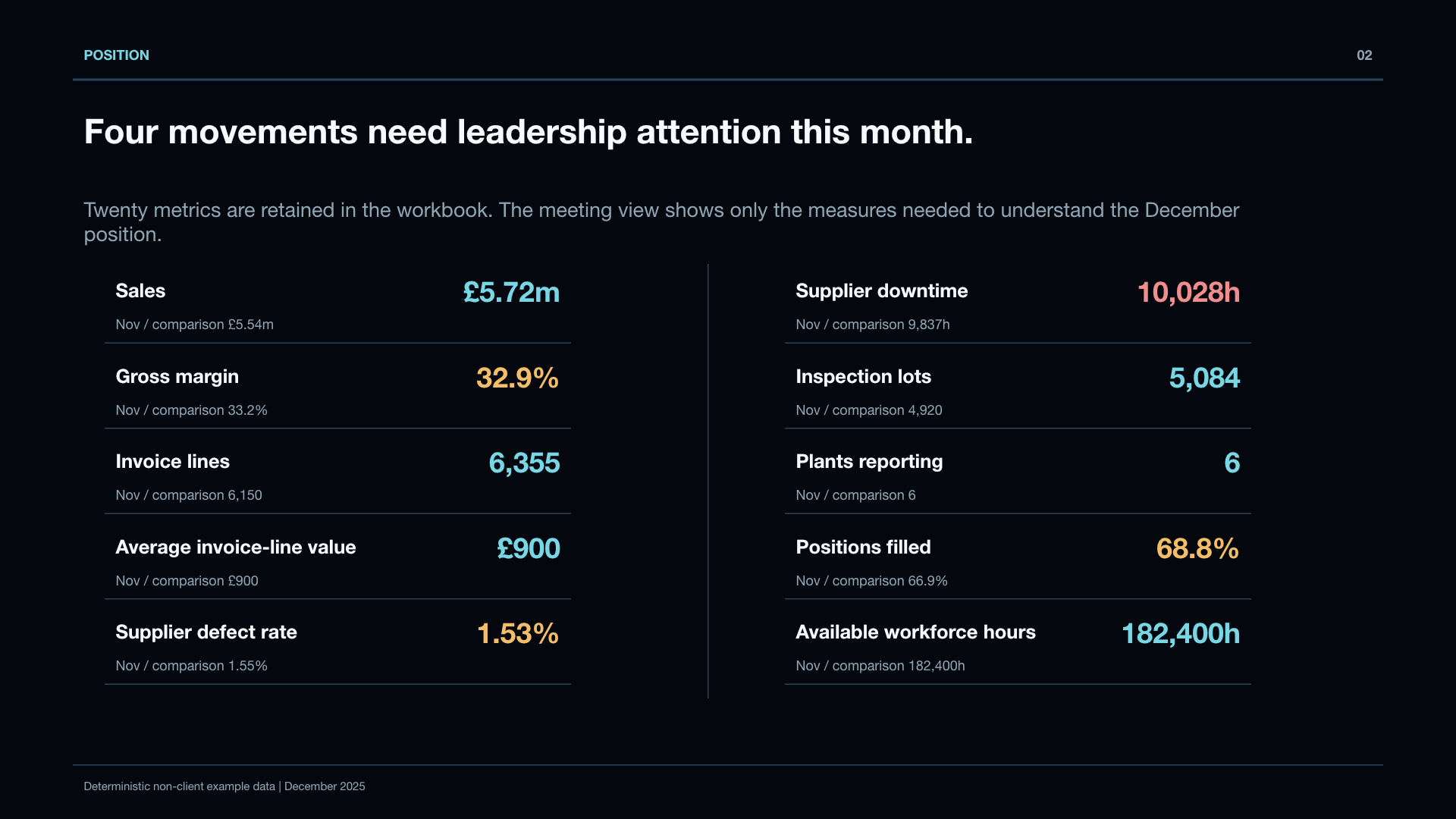
PowerPoint operating review page showing selected December sales, margin, supplier-quality and workforce metrics
03

Monthly Operating Review Pack

A six-page operating review that replaces a long status pack with a concise explanation of performance, four material exceptions, three decisions and named follow-up actions.

December position. The presentation keeps the meeting view concise while the workbook retains all twenty measures.Inspect this project
Excel record trace linking D07 metric result MR-02784 to request COM-2025-12-IND-AGED, decision DEC-COM-040 and action ACT-COM-2025-12-01
04

Monthly Performance Commentary and Decision Log

A working Excel process that requests explanations for significant metric movements before the monthly meeting and carries unanswered decisions and actions into the next reporting cycle.

One movement from figure to follow-up. Seven retained records connect the starting metric, breached threshold, manager explanation, finance challenge, meeting decision and January action.Inspect this project

Related capabilities

The build method follows the reporting need.

Working boundary

Automation comes after the monthly routine is understood.

The work improves an agreed reporting routine. It does not automate unclear rules or replace the finance, sales or warehouse systems that create the records.

Bring one troublesome report, the files currently used and a short explanation of who reviews it. Confidential or protected data is not needed for the first conversation.

Discuss a reporting routineReturn to all solutions