Deterministic issue handling
DuckDB, SQL and Excel retain 60 issues, 469 history events and 56 independent retests. The named record reaches a verified report decision.

Automation
For reporting, operations and assurance teams whose recurring refreshes, reminders, approvals or follow-up depend on manual coordination.
Quanta Meridian records who must respond, which evidence version was submitted, what the reviewer decided and what condition allows the action to close.
When follow-up needs structure
Order line OL-0001001 contains a product code that is absent from the category reference. The reporting analyst raises DQI-2025-07-001 because £5,747.91 is missing from Product category 06 and two monthly reports cannot be issued as prepared.
The analyst assigns the issue to the Product data owner, records a temporary reporting workaround and keeps the submitted correction separate from the independent retest. A reminder may prompt the owner, but it cannot decide that the report is safe to release.
Six selected history events retain the requester, action owner, independent reviewer and closure owner with UTC timestamps and linked hashes. The same record can be reopened without erasing the earlier decision.
A bounded first review
One recurring task, the record currently used to track it and an example of a reminder, exception or approval that is difficult to explain later.
Map the trigger, allowed status changes, responsible roles, human decision, retry limit and evidence needed to resume after failure.
A bounded operating contract, one retained action trace and a decision on whether a local script, workbook routine or governed workflow service is proportionate.
A trigger starts the recorded sequence through validation, owner response and human review. Short-lived technical faults may retry within a fixed limit. Invalid submissions and returned decisions go back to the named owner.
Action ID · owner role · due date
Required values · current status · permission
Version · link · checksum · submitted date
Accept · return · ask a question
Owner · response · next due date
Retry the connection or return the record to its owner
Stop when the limit is reached
Evidence · due date · escalation
Started · changed · decided · completed
Action, owner role, due date and finding recorded
Required fields, role and current history
Evidence link, version and submission date retained
Question, reason and reviewed version remain visible
Closure or rework cannot overwrite the earlier history
A future owner can explain why the action closed
Retry within a fixed limit, then stop and notify the owner.
Do not retry. Retain the reason and assign it for resolution.
DQI-2025-07-001 begins when OL-0001001 fails DQ-02. The request, owner response, independent retest and report release retain their roles and UTC timestamps.
Reporting analyst
DQ-02 failed for OL-0001001 in run DQ-2025-07-INITIAL.
history hash · 3b9a2c88764cReporting analyst
Assigned to Product data owner; due 2025-07-06.
history hash · 21ac35a29fbaReporting owner
Hold the supplier category section and retain the affected lines outside the report total.
history hash · 94bab3f9a470Product data owner
Add the product code to the category reference and reload the affected line.
history hash · 6cef624548f4Independent data-quality reviewer
Release affected report
history hash · b05f0767f7cdReporting owner
The fix passed an executed independent retest.
history hash · 0269e69cc645RELEASE: The fix passed an executed independent retest.
View the issue historyExecuted and production boundary
DuckDB, SQL and Excel retain 60 issues, 469 history events and 56 independent retests. The named record reaches a verified report decision.
Authentication, permissions, scheduled notifications, monitoring and recovery must be tested in the intended environment before the workflow is relied on.
Automation decision framework
The method keeps the process, human decision and operating responsibility in view. A faster step is not useful if nobody can explain its failure or safely resume it.
The action, evidence requirement, owner, due date and allowed status changes are defined before any workflow is built. Every command writes a dated history event.
Reminders can prompt a response, but a file upload does not close an action. The evidence reviewer accepts, returns or questions a specific version, and permissions restrict who can make that decision.
The retained implementation package includes the record schema, transition rules, role notes, tests and rebuild guidance. Production connections, permissions and monitoring must be validated in the chosen environment.
Failure, retry and recovery
The automation records what happened, selects a proportionate response and stops when continuing would hide an unresolved problem.
A temporary service or connection fault may wait and retry. The count, delay and final failure remain in the run history.
Stop after the agreed limit and notify the operational owner.A missing file, invalid value or unresolved rule will not improve through repetition. Retain the input and send it to the person who can resolve it.
Resume only when the correction or accepted limitation is recorded.A rejection is a human response, not a failed connector. Keep the reason, reviewer and requested change attached to the request.
Rework, review again and preserve both decisions.Automation types
The options can work together, but each has a different purpose. The smallest maintainable workflow is preferable to a larger platform that the team cannot operate.
Repeated files share a stable structure and a controlled workbook or dataflow is the right operating surface.
Expected files, schema changes, malformed inputs and final checks must remain visible rather than being skipped.
Microsoft 365 records need reminders, approvals, owner updates or evidence follow-up with retained status history.
Permissions, licensing, connections, environments and application lifecycle management are part of the design.
Transformations or checks need scheduled execution, code review, repeatable tests and retained run metadata.
A scheduler starts work; it does not make the code idempotent, observable or safe to retry.
A person must decide, acknowledge, supply evidence or respond before the next action can continue.
A notification is not ownership. The request needs a due date, recorded response and escalation or expiry rule.
An agreed dataset and template need a repeatable report with validation and a controlled issue decision.
Automated production does not replace commentary, materiality review or release approval where those remain necessary.
Workflow operating standard
Release management covers how a workflow is configured, tested, released, monitored and changed. It matters when an automation becomes part of a reporting or assurance routine.
Workflow definitions and environment-specific configuration should be kept separate, so connections, endpoints and mailbox identities can change without rewriting the decision logic.
Changes are tested away from live use, then released through an agreed version and recovery process. Exported definitions and release history show what changed and who authorised it.
Operational ownership continues after release. Someone remains responsible for failures, connections, permissions and the decision to change or retire the workflow.
The workflow handover
Make the current process, decisions and exceptions clear enough to choose a proportionate automation.
The workflow handover retains current process and automation decision map and trigger, owner and system-of-record definition.
Connect the trigger to validated actions, human review and a deliberate response when the routine fails.
The workflow handover retains controlled refresh, workflow or scheduled job and validation, exception, retry and recovery tests.
Leave the next owner with the history, release instructions and information needed to maintain the automation.
The workflow handover retains run, approval and status history and ownership, environment, release and recovery notes.
Related examples
Each build keeps repeatable processing separate from the human judgement or platform behaviour it cannot verify on its own.
Owned correction and independent retest
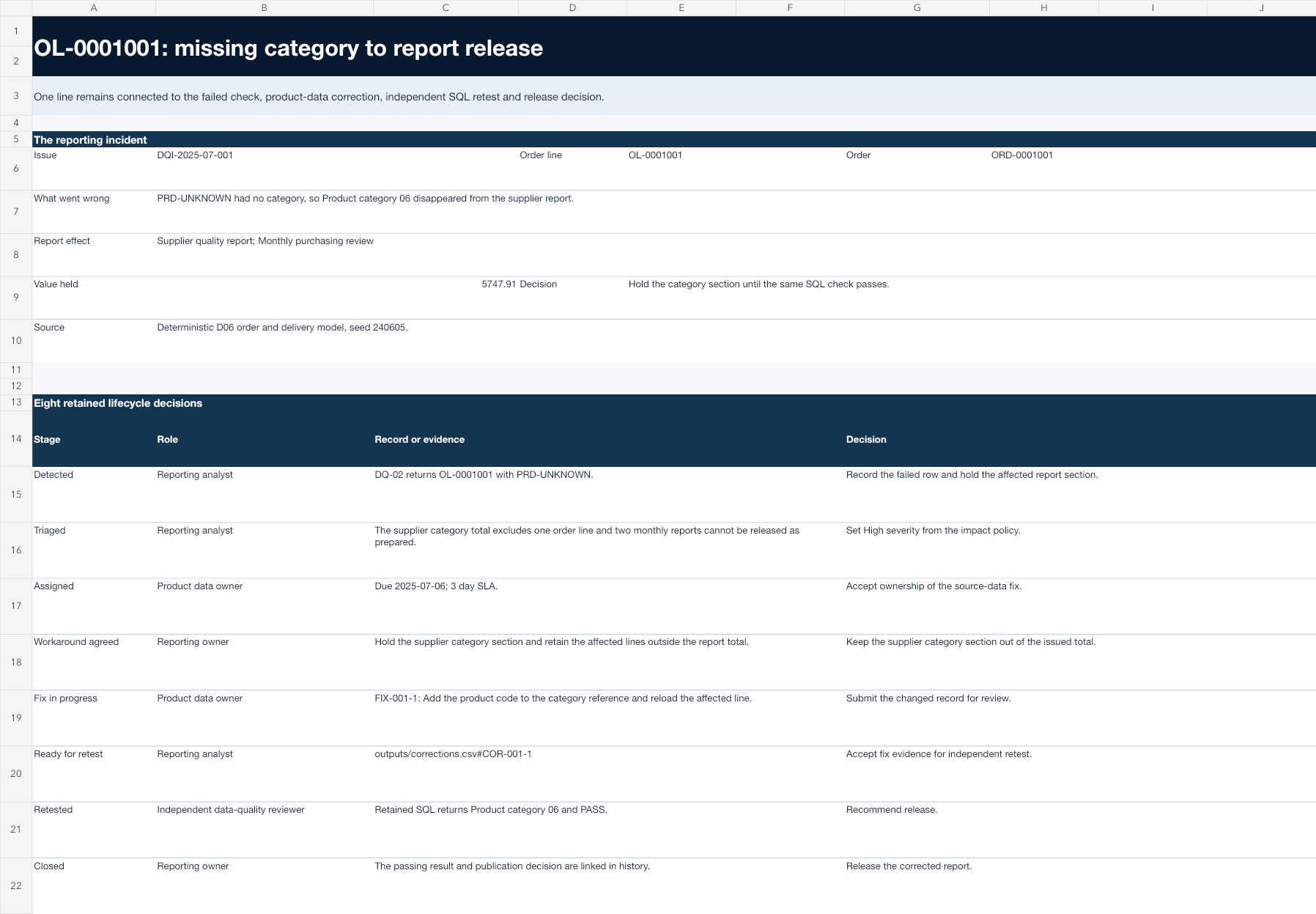
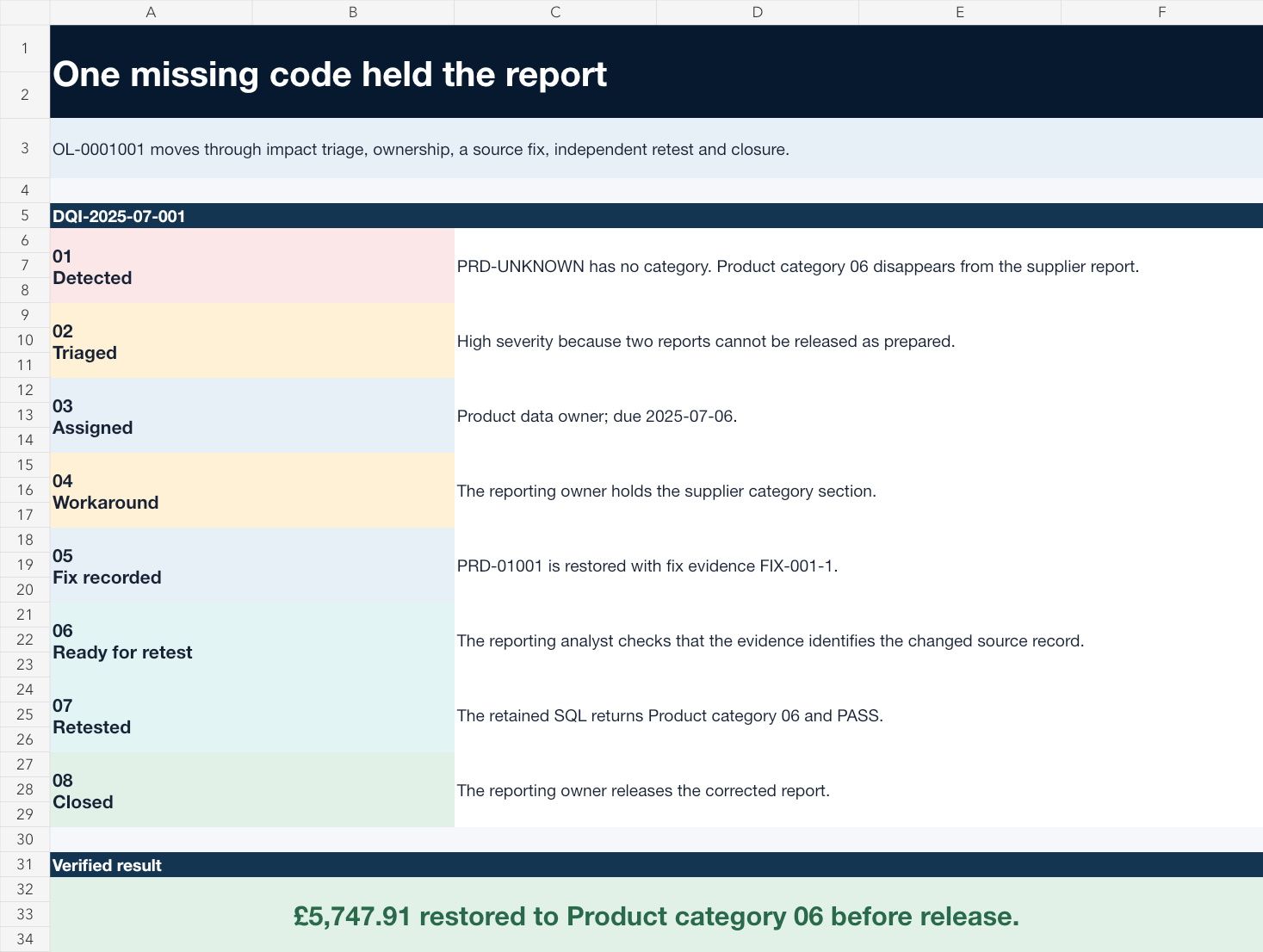
A reporting data incident register that holds an affected report section, separates the product-record correction from independent retest and records release, limitation or reopening without erasing history.
Shows the requester, data owner, reviewer and reporting owner as separate dated events in a hash-linked issue history.
PRD-UNKNOWN is replaced by PRD-01001. The retained SQL returns Product category 06 and PASS before the reporting owner releases the corrected report.Inspect Reporting Data Issue and Retest RegisterDeterministic intake with a human hold
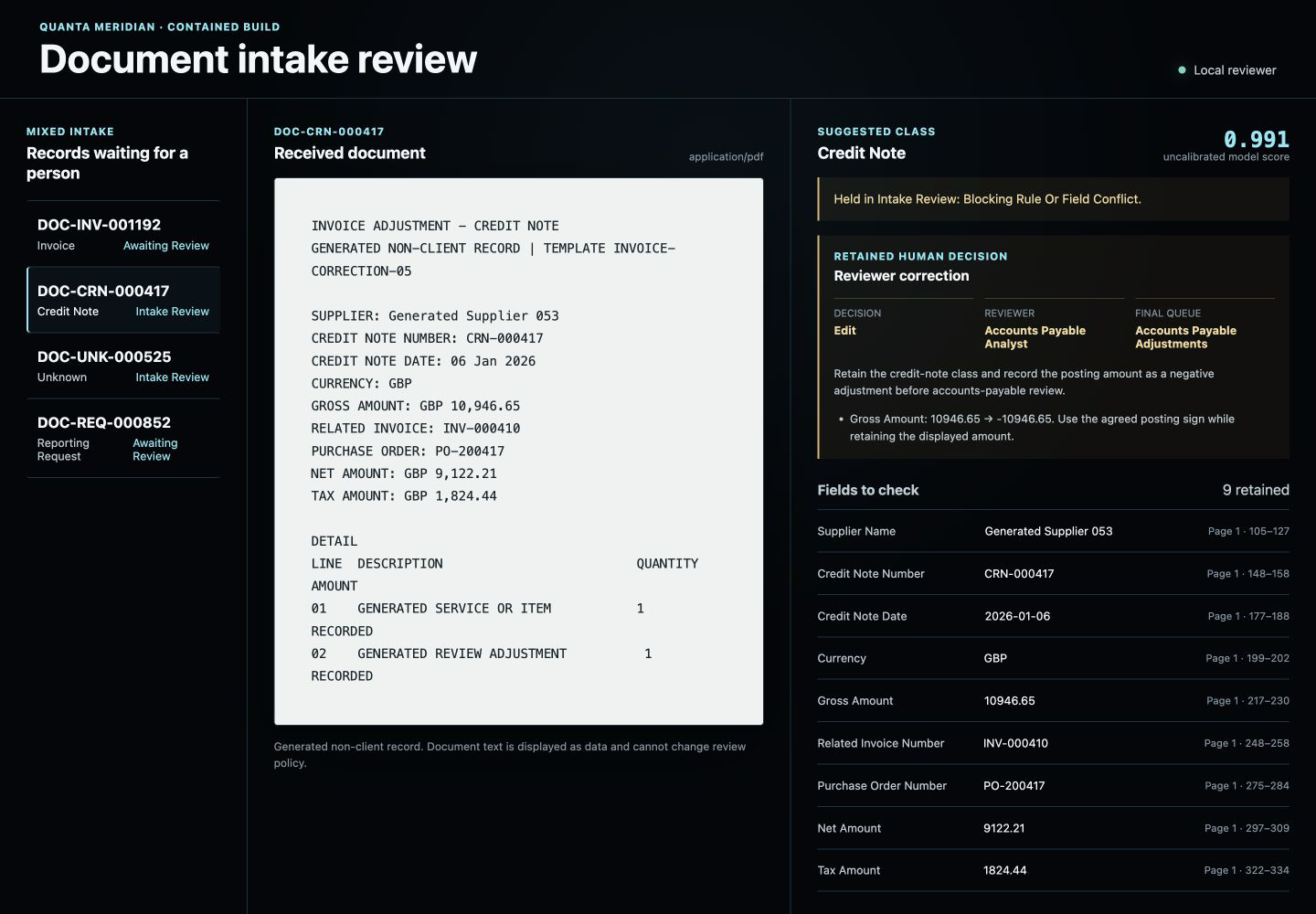

A Finance and Operations intake receives mixed invoices, credit notes, receipts, evidence documents and reporting requests. The build prepares a suggested record and queue, but holds contradictory or incomplete items for a named reviewer.
Shows a contained Python routine that prepares a suggestion but keeps contradictory records with the intake analyst.
The screen keeps the original credit-note suggestion, two blocking checks and the reviewer’s negative posting adjustment together.Inspect Document and Request TriageReviewer question, rematch and decision
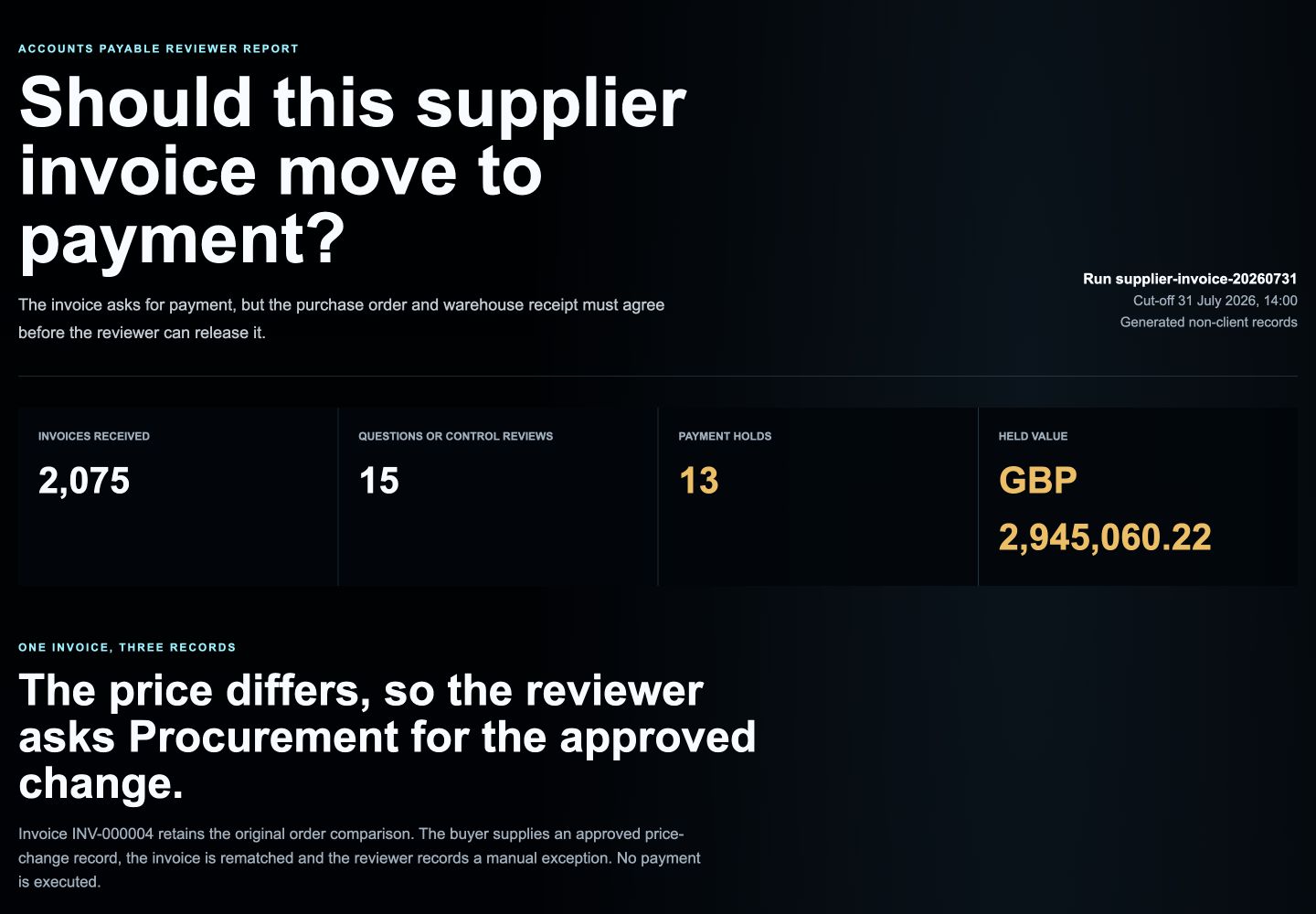

The invoice asks for payment, but the purchase order and warehouse receipt must agree before the reviewer can release it.
Shows SQL-driven comparison and a retained reviewer decision without claiming that the build executes payment.
The screenshot is produced from the retained SQL reporting views after all project checks pass.Inspect Supplier Invoice Matching and ReviewRequest, challenge and carried action
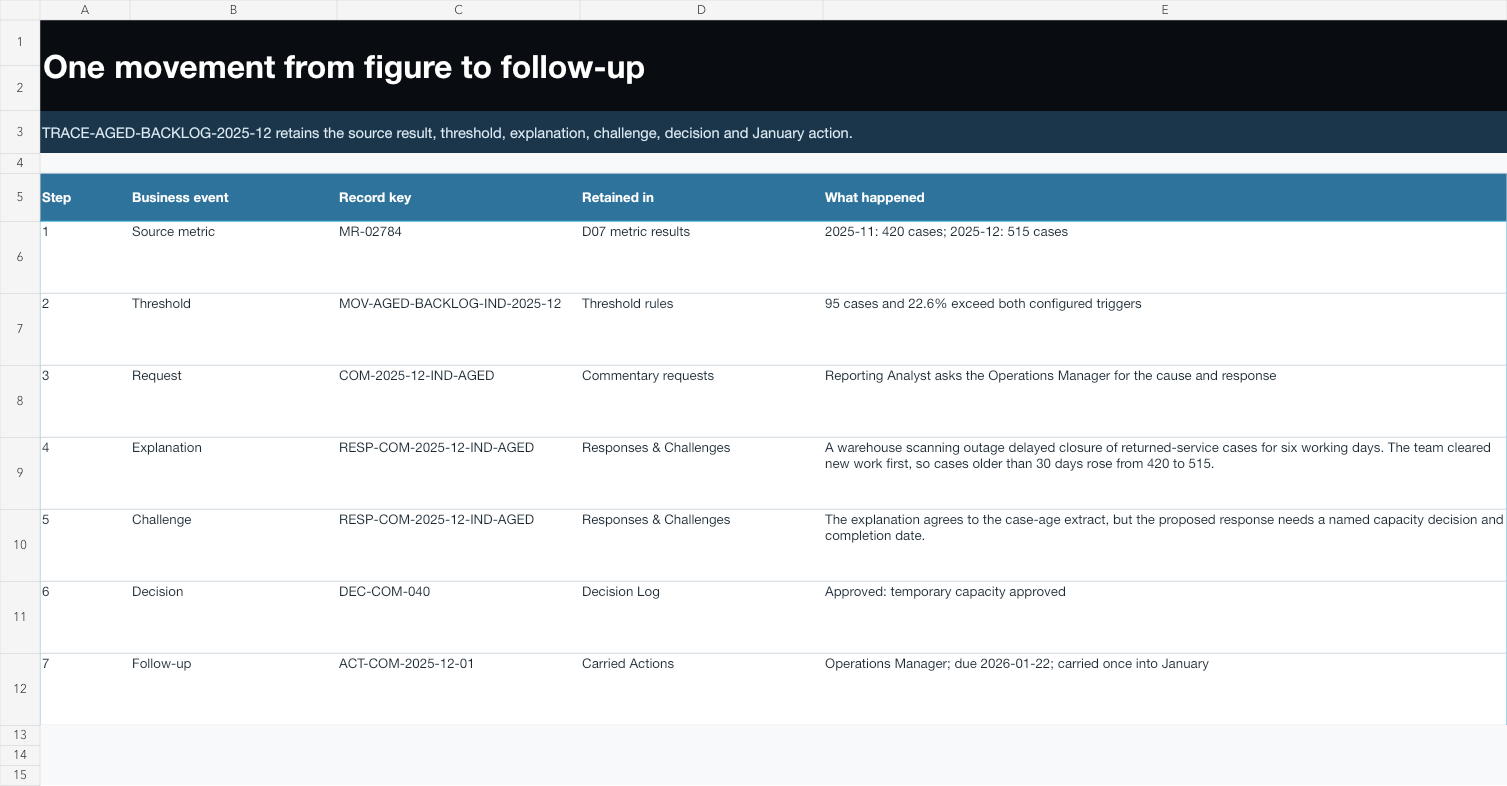

A working Excel process that requests explanations for significant metric movements before the monthly meeting and carries unanswered decisions and actions into the next reporting cycle.
Shows a workbook routine that keeps the reporting request, manager explanation, finance challenge and meeting action connected.
Seven retained records connect the starting metric, breached threshold, manager explanation, finance challenge, meeting decision and January action.Inspect Monthly Performance Commentary and Decision LogRelated capabilities
Excel and Power Query are used when people need a familiar workbook without hiding file intake, transformation logic, adjustments or checks.
Explore the Excel and Power Query capabilitySQL gives invoice lines, orders, receipts and reference data a declared grain before they become shared reporting totals.
Explore the SQL capabilityPython turns reporting rules and analytical methods into repeatable runs with declared inputs, retained results and tests another analyst can inspect.
Explore the Python capabilityScope and limitation
A first conversation should use one repeated routine, its current record and the person accountable for the final decision.
Bring one recurring routine, its current trigger and a short account of the decisions or failures that still need people. Confidential or protected data is not needed for the first conversation.
Discuss a repeated processReturn to all solutions